
WeTrack - Location Tracker
Khan eCodingTools
3.732.00 Reviews
- Version
- 1.0.4
- Installs
- 1.00M
- Age Rating
- Everyone
Screenshots
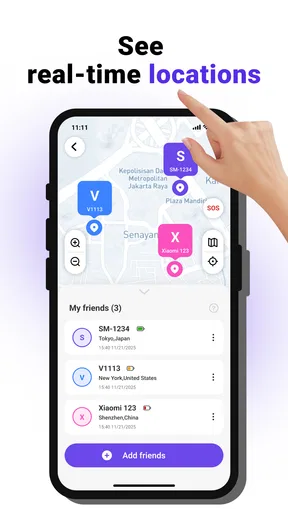
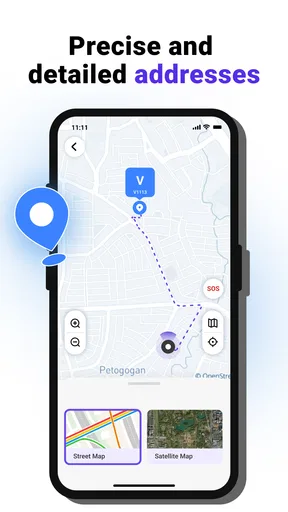
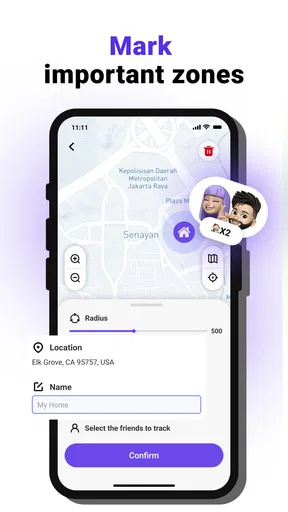
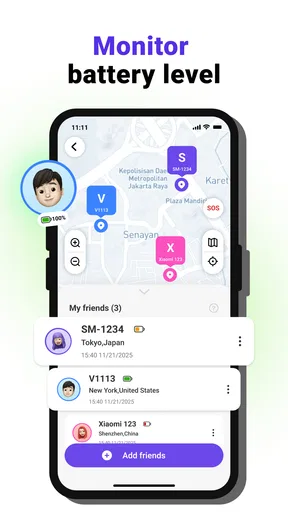
Our Review of WeTrack - Location Tracker
 Analysis by Appyee
I approached WeTrack - Location Tracker as a practical family-safety tool rather than a general navigation app. Its purpose is straightforward: help people keep track of family locations, receive alerts when someone reaches a place, and send an SOS with consent. That narrow focus is important, because the app makes the most sense when everyone involved agrees on how it will be used. It is not a substitute for trust, conversation, or emergency services, but it can reduce the need for repeated “Where are you?” messages during an ordinary day.
In my experience, the best use of a location-sharing app is not constant checking. It is setting up a few clear routines: a parent wants to know when a child arrives at school, a household member wants reassurance that someone reached work, or relatives want a simple way to signal that help is needed. WeTrack fits that kind of arrangement. The store summary describes family location tracking, place alerts, and consent-based SOS sharing, and those three ideas define the experience more accurately than a long list of extra promises would.
How WeTrack feels in everyday use
The app comes from Khan eCoding and sits in the Tools category. It is free, carries an Everyone age rating, and has passed the one-million-install mark. Its current version is 1.0.4, with Android support beginning at version 7.0. That combination makes it accessible to households using a mixture of newer and older Android phones, although the experience will still depend on the condition of each device and the way location access is handled on it.
One thing I appreciate is that the concept is easy to explain to another family member. You are not asking someone to learn a complicated social network or a full travel-planning system. You are asking them to participate in a shared safety arrangement. That simplicity can be a real advantage when the person joining the group is not especially comfortable with technology.
The trade-off is that a simple concept does not remove the need for careful setup. Location tracking affects privacy, battery use, and personal boundaries. I would not install it on someone else’s phone and assume the job is finished. I would first explain who can see the location, when alerts are useful, and what the SOS option is intended to do. Consent is part of the feature, not a minor detail around it.
What to expect from speed
For this type of app, perceived speed is less about flashy animation and more about whether a location or alert appears when you need it. WeTrack should be judged by the clarity of its basic actions: opening the family view, checking a shared location, reviewing a place alert, or reaching the SOS function without confusion. A lightweight tool can feel fast even when it does fewer things, because there are fewer layers between the user and the task.
I would especially value that directness during a quick check. If I am waiting for a family member to arrive, I do not want to browse through unrelated content first. A focused interface is useful here. At the same time, location information is never entirely like reading a static note. It can depend on the other phone, its connection, and its ability to provide an updated position. That means a delayed update should not immediately be interpreted as proof that someone is in danger.
This is one of the most important expectations to set before relying on the app. WeTrack can support awareness, but it should not create an illusion of live, perfectly continuous supervision. If a family member is travelling through an area with poor connectivity or using a phone that is struggling in the background, the information may not feel as immediate as a user hopes. For urgent situations, direct contact and local emergency services remain the safer response.
Where the app earns its place
The place-alert idea is more useful than repeatedly opening a map. A simple arrival routine can remove several small interruptions from the day. For example, I could agree with a family member that they will share their location while travelling to an appointment, with an alert tied to the destination. Instead of sending messages during the journey, I can wait for the agreed arrival signal and contact them only if the expected routine changes.
That workflow also shows why boundaries matter. I would create alerts for meaningful destinations rather than every stop. Too many alerts turn a safety tool into background noise, and background noise is dangerous because important notifications become easier to ignore. A short list of places—home, school, work, or a regular care location—usually makes more sense than trying to record every movement.
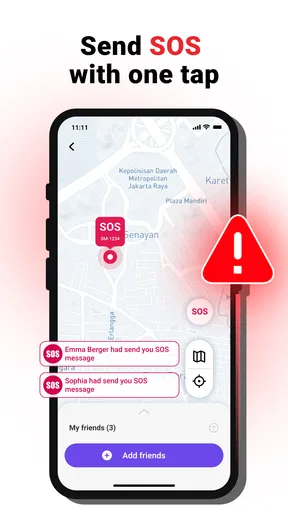
The SOS function has a different role. It should be treated as a prepared way to ask for help, not as a replacement for calling emergency responders. Before depending on it, I would make sure every participant understands who receives the signal and what they are expected to do afterward. A family can agree on a simple response: call the person, check the shared location, and contact appropriate local help if the situation appears serious.
Heavy-use moments and practical friction
WeTrack is likely to feel most demanding when several people are moving at once and the household is checking locations repeatedly. A parent might be watching for an arrival while another family member is travelling and a third person is preparing an SOS arrangement. In those moments, the value of the app comes from prioritization. The more often people open it without a clear reason, the more likely they are to misread a normal delay or overlook the alert that actually matters.
My recommendation is to use it around agreed events rather than as a constant surveillance screen. Check before a journey, wait for a place alert, and respond to an unexpected change. This approach is also kinder to the phones involved. Frequent location-related activity can be more noticeable on battery life than occasional checks, especially on older devices. I would not make the app the only reason a phone is expected to last through a long day without charging.
Another source of friction is the human side of shared tracking. One person may see the arrangement as reassuring while another may feel watched. WeTrack cannot solve that disagreement through technology. If a family member is uncomfortable, the answer is to discuss the purpose and limits of sharing, not to hide the app or pressure them into participation. The consent-based SOS positioning is a useful reminder that the tool works best when the people involved understand and accept the arrangement.
A less obvious but valuable habit is to test the routine before a real journey. I would set up a harmless arrival scenario, confirm that the intended person understands the alert, and decide what happens if the notification is late. That small rehearsal exposes confusion early. It is much better to discover an unclear response plan at home than during a stressful trip.
Reliability is a shared responsibility
For a location tracker, reliability is not just a property of the application. It is a chain involving the sending phone, the receiving phone, network availability, device settings, and user behavior. If one link is unavailable, the result may be incomplete even when the app itself is functioning normally. That is why I would use WeTrack as one layer of communication rather than as a guarantee that a person can always be found.
The app’s one-million-plus installs suggest that the concept has reached a substantial audience, while its average rating of 3.7 from around 3.3 thousand ratings points to a more mixed overall reception than a universally smooth experience. I read that as a reason to keep expectations practical. The app may be useful for many households, but users should still spend time checking whether its behavior suits their particular phones and routines.
When an expected alert does not arrive, I would troubleshoot in a calm order. First, I would contact the family member directly. Then I would check whether the journey or destination was understood correctly, whether the phone is reachable, and whether the person has changed their routine. Only after those simple explanations would I treat the missing update as a technical concern. This order prevents the app from turning ordinary misunderstandings into unnecessary panic.
Recovery matters as much as normal operation. A good family routine should include a backup method, such as a phone call or ordinary message, for situations where the app is unavailable or a person cannot interact with it. I would also revisit the arrangement when someone changes phones, travels somewhere unfamiliar, or stops using the app regularly. A tracking setup that worked last month may not be the setup the family is actually following today.
Older phones and device limits
Android support beginning at version 7.0 makes WeTrack relevant to people who do not own the newest hardware. That is helpful for families who share devices across generations. An older phone can still be perfectly adequate for basic communication, but age can affect battery condition, background behavior, storage pressure, and general responsiveness. Those factors matter more to a location tool than a simple app that is opened once a week.
I would be cautious about placing the most important role on a phone with a weak battery or unreliable connectivity. If the device regularly powers off during the day, the family may receive no useful location information at the moment it is needed. The practical solution is not necessarily buying a new phone immediately; it may be charging before travel, carrying a power bank, or choosing a different person to receive the alert. The app can only work with the device available to it.
Older Android versions can also make users more sensitive to background activity and system restrictions. Rather than assuming that every phone behaves identically, I would run a short real-world test on each device. Leave the phone in the way it will normally be carried, travel a familiar route, and confirm that the household understands what an update or alert looks like. This is a more useful performance check than relying on a quick installation alone.
Storage and general phone clutter can also affect the experience indirectly. If a device is already slow, overloaded, or frequently closing apps, a family should avoid interpreting every delay as a failure specific to WeTrack. The sensible approach is to keep the phone charged, updated as far as its system allows, and available for the communication routine. If that sounds like too much maintenance for the household, a simpler call-and-message agreement may be the better choice.
Who will benefit most
I think WeTrack is best suited to families that want a shared, limited-purpose safety routine. It can be a good fit for a parent and child who need arrival awareness, relatives coordinating care for an older family member, or adults who want an agreed SOS channel during commutes. The free price also lowers the barrier for households that want to try the arrangement before committing to a paid service.
It is particularly useful when the question is “Has this person reached the agreed place?” rather than “Where has this person been all day?” That distinction keeps the tool focused and reduces the temptation to turn it into a constant monitoring system. A few meaningful alerts can provide reassurance without filling everyone’s day with notifications.
I would skip it if the people involved do not agree about location sharing, if the household needs professional fleet or employee monitoring, or if the main requirement is detailed route history and advanced travel planning. A dedicated navigation service is usually better for directions, while a mature family platform may be a stronger choice for households that need a broad ecosystem of communication and device-management tools. WeTrack’s appeal is its focused family-tracking purpose, not its ability to replace every related app.
How it compares with ordinary alternatives
The usual alternative is simply calling or messaging. That remains better when you need a conversation, an explanation, or immediate confirmation that a person is safe. A message can also be more respectful when location sharing would feel excessive. WeTrack becomes more convenient when the same arrival question happens repeatedly and an agreed place alert can handle it without interrupting the traveller.
Another alternative is a general map-sharing service. Those tools may be preferable for people who already use them daily and want location sharing integrated with navigation. WeTrack is more appealing when the household wants a dedicated safety-oriented routine with family locations, place alerts, and consent-based SOS in the same focused context. The best choice depends less on the number of features and more on whether everyone will actually use the arrangement consistently.
There is also a difference between an app and a formal care or security service. WeTrack can help relatives coordinate awareness, but it does not turn a family into a staffed monitoring centre. If someone needs guaranteed professional response, medical support, or a regulated emergency system, this is not the right category of solution. I would rather see a family recognize that boundary early than assume an app alone can carry a responsibility it was never meant to carry.
My performance verdict
After considering the way it is intended to be used, I see WeTrack as a focused and approachable tool whose performance depends heavily on realistic expectations. Its strongest quality is the simple workflow: share family locations by agreement, use place alerts for meaningful destinations, and keep SOS available as part of a previously discussed response plan. That is enough to solve a real everyday problem without forcing every household member into a complicated system.
Its weaknesses are equally practical. Location updates should not be treated as perfectly immediate, older or heavily used phones may make the experience less dependable, and excessive checking can create both battery pressure and alert fatigue. The app also cannot repair a lack of consent or replace direct communication. Those are not small footnotes; they determine whether the tool feels reassuring or stressful.
WeTrack has an average rating of 3.7, and the app has 31 reviews listed alongside that rating. I would take those figures as a prompt to test it with your own family rather than making a decision from popularity alone. Because it is free and rated for Everyone, trying a small, clearly defined routine is relatively easy: choose one destination, explain the boundaries, test the alert, and keep a backup contact method ready.
My final recommendation is positive for households that want uncomplicated location awareness and are willing to treat privacy, battery life, and backup communication seriously. I would recommend it to a friend for agreed arrival checks and family SOS planning, but not as a sole emergency safeguard or a tool for secret monitoring. Used with those limits, WeTrack is most valuable when it quietly removes repeated uncertainty without pretending to provide perfect certainty.
Verdict
Strengths of WeTrack - Location Tracker
- Live location updates help monitor family members or friends.
- Location history makes it easier to review past movements.
- Geofencing alerts can notify you when someone enters or leaves an area.
- The interface is simple enough for nontechnical users.
- Useful for coordinating meetups or checking on loved ones remotely.
Limitations of WeTrack - Location Tracker
- Accurate tracking depends on GPS, mobile data, and battery availability.
- Continuous location sharing can drain the tracked device’s battery.
- Privacy concerns may arise if consent and sharing settings are unclear.
- Some useful tracking features may require a paid subscription.
- Indoor locations and weak-signal areas can produce inaccurate results.
Other Releases by Khan eCoding
View All
Vibify-offline MP3
Music & Audio4.2
Similar Picks in This Category
View All
Google LLC4.0

Gboard - the Google Keyboard
Google LLC4.5

Google Play services
Google LLC4.3

Google Play Store
Google LLC4.9

Files by Google
Google LLC4.5

SHAREit: Transfer, Share Files
Smart Media4U Technology Pte.Ltd.4.3
Frequently Asked Questions
What is WeTrack - Location Tracker used for?
WeTrack - Location Tracker is designed to help users share and monitor locations with trusted contacts, such as family members, friends, or members of a group. Depending on the available features and permissions, it may show real-time or recent location information, helping users coordinate meetups, check that someone has arrived safely, or stay connected during travel and daily activities.
Does WeTrack - Location Tracker require constant location access?
Location tracking applications commonly need access to your device’s location, and some features may require permission to work while the app is running in the background. During testing, users should carefully review the permission requests and select the option that matches their needs. Continuous tracking can also increase battery usage, so it is worth checking background activity and privacy settings before enabling it.
Can I control who sees my location in WeTrack?
Location privacy is one of the most important aspects to check before using WeTrack. Users should only share their position with people they trust and review any contact, group, or invitation settings available in the app. If the application provides temporary sharing, visibility controls, or a stop-sharing option, these tools should be used whenever continuous location access is no longer necessary.
Will WeTrack - Location Tracker work accurately everywhere?
The quality of location information depends on GPS reception, Wi-Fi, mobile data, device settings, and the surrounding environment. Buildings, underground areas, dense cities, poor network coverage, and battery-saving modes can delay or reduce accuracy. WeTrack should therefore be treated as a convenience and safety-support tool rather than a guaranteed emergency or professional tracking system.
Is WeTrack - Location Tracker free to download and use?
The download price and available features may vary between Android and iOS, and the app may include advertising, optional purchases, subscriptions, or limitations on certain tracking functions. Before installing, check the current store listing for pricing, supported devices, subscription terms, and required permissions. Also review the privacy information to understand how location and account data may be collected or shared.
